


gitsnitch 🗡️🦆

Lints your Git commit history against a declarative ruleset - locally as a pre-commit/pre-push hook, or in any CI/CD pipeline.
Think of it as a linter, but for commit hygiene - enforced consistently across every author and every environment.
Source and issue tracker: github.com/iilei/gitsnitch
Why
Most commit linting stops at commit-message formatting.
Real-world teams often need more:
- policy-aware CI enforcement
- severity-based gating
- diff-aware assertions
- portable shared rulesets
- reliable behavior in shallow CI clones
GitSnitch was built around those workflows.
gitsnitch vs gitlint
As gitlint is a well-known tool with a similar purpose, here is a brief comparison of gitsnitch and gitlint.
| Criterion | gitsnitch | gitlint | Comment |
|---|---|---|---|
| Automatic incremental unshallowing of shallow clones | 🟢 Yes | 🔴 No | gitsnitch can incrementally deepen shallow clones during history traversal when needed. |
| Machine-readable JSON output | 🟢 Yes | 🔴 No | gitsnitch emits structured JSON output suitable for CI parsing and policy gates. |
| Severity propagation into automation | 🟢 Yes | 🔴 No | gitsnitch exposes the maximum encountered severity as .max_violation_severity, which is easy to consume in automation. |
| Custom assertions | 🟢 Yes | 🟡 See comment | gitsnitch supports declarative assertions in config; gitlint custom rules are implemented via Python rule files. |
| Portable shared assertion config | 🟢 Yes | 🟡 See comment | gitsnitch config can be handed over DRY via stdin or relative paths; with gitlint under pre-commit, custom Python rule file paths are not reliably portable because pre-commit executes gitlint from a different working context, which can break relative paths. |
| Assertions using file-change context | 🟢 Yes | 🔴 No | gitsnitch assertions can evaluate commit file-change context directly. |
| Assertions using diff-aware matching | 🟢 Yes | 🔴 No | gitsnitch supports path/line-aware diff matching via diff_match_any and diff_match_none. |
| Branch naming conventions | 🟡 See comment | 🟢 Yes | gitsnitch does not enforce branch naming locally; teams commonly enforce this through server-side branch/push rules (GitHub/GitLab/Bitbucket). |
Quick start with pre-commit
gitsnitch ships with pre-commit hooks out of the box. Add this to your .pre-commit-config.yaml:
# .pre-commit-config.yaml
repos:
  - repo: https://github.com/iilei/gitsnitch
    rev: v0.4.6  # run pre-commit / prek with autoupdate --freeze to get the latest version
    args:
      - --preset
      - conventional-commits
    hooks:
      - id: gitsnitch-commit-msg  # lints the staged commit message at commit time
Three hooks are available:
| Hook id | Stage | Purpose |
|---|---|---|
gitsnitch |
pre-push |
Lints the full commit range being pushed |
gitsnitch-commit-msg |
commit-msg |
Lints the staged commit message and index diff at commit time |
gitsnitch-single-commit |
manual |
Lints a single commit; supply --commit-sha via args |
Requires pre-commit ≥ 4.0.0. The hooks are implemented in Rust (language: rust) and compiled once on first use — no additional runtime dependencies required.
Inspecting the highest severity encountered
Every JSON report includes max_violation_severity — the highest severity value seen across all violations, or 0 when none are found. Useful for threshold checks in scripts:
gitsnitch \
  --preset forbid-wip --preset conventional-commits \
  --target-ref HEAD^^^ --source-ref HEAD \
  --output-format json \
  | jq '.max_violation_severity'
If you prefer to install the binary directly, see the options below.
Installation
Pre-built binaries are available for macOS, Linux, and Windows.
Homebrew (macOS / Linux)
brew tap iilei/tap
brew install --formula iilei/tap/gitsnitch
cargo-binstall
cargo binstall gitsnitch
NuGet / Chocolatey (Windows)
choco install gitsnitch
Binary from releases
Download the latest archive from the releases page, extract the binary, and place it on your PATH.
Locally installed binary with pre-commit
Once installed, you can invoke gitsnitch directly in CI/CD pipelines, or wire it into pre-commit as a local hook using language: unsupported (pre-commit ≥ 4.4.0, formerly language: system). This skips compilation entirely and delegates to the binary already on your PATH:
# .pre-commit-config.yaml
repos:
  - repo: local
    hooks:
        # gitsnitch_preinstalled requires:
        #   - `gitsnitch` installed and available on `PATH`
        #     -- see https://github.com/iilei/gitsnitch/#installation
        #   - a discoverable GitSnitch config file, for example `.gitsnitchrc`
        #     -- see https://github.com/iilei/gitsnitch/blob/master/.gitsnitchrc.toml
      - id: gitsnitch_preinstalled
        name: gitsnitch (pre-push / preinstalled)
        description: Lint the commit range being pushed.
        entry: |-
            gitsnitch --no-violation-severity-as-exit-code \
                --remap-env-var GITSNITCH_SOURCE_REF=PRE_COMMIT_TO_REF \
                --remap-env-var GITSNITCH_TARGET_REF=PRE_COMMIT_FROM_REF
        language: unsupported
        pass_filenames: false
        always_run: true
        stages: [pre-push]
        minimum_pre_commit_version: 4.4.0
        args:
          - --preset
          - conventional-commits
See the pre-commit docs on language: unsupported for details.
Authoring custom assertions
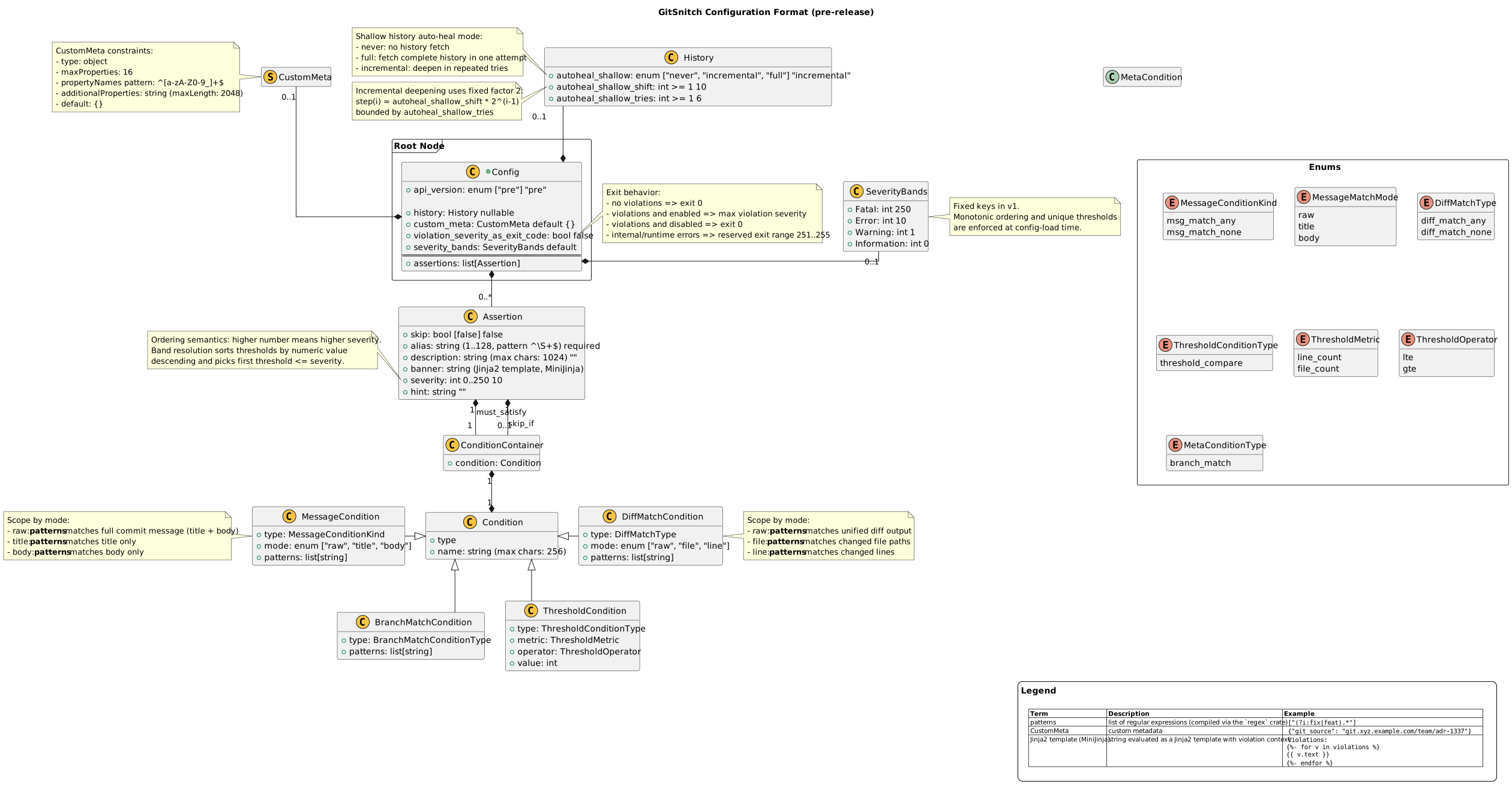
Custom assertions are defined declaratively in the GitSnitch config API. In practice, that means you compose rules around commit message fields, diff content, file path patterns, and severity levels instead of writing hook logic by hand.
The diagram below gives a quick map of the config model. Click it to open a full-window view.
Philosophy
GitSnitch is intentionally designed around:
- local developer ergonomics
- centrally enforceable policies
- machine-readable automation signals
- incremental adoption instead of hard lock-in
Or, put differently:
“commit often” is still encouraged —
the duck just wants the history cleaned up before it reaches main.